Basic SQL Statements
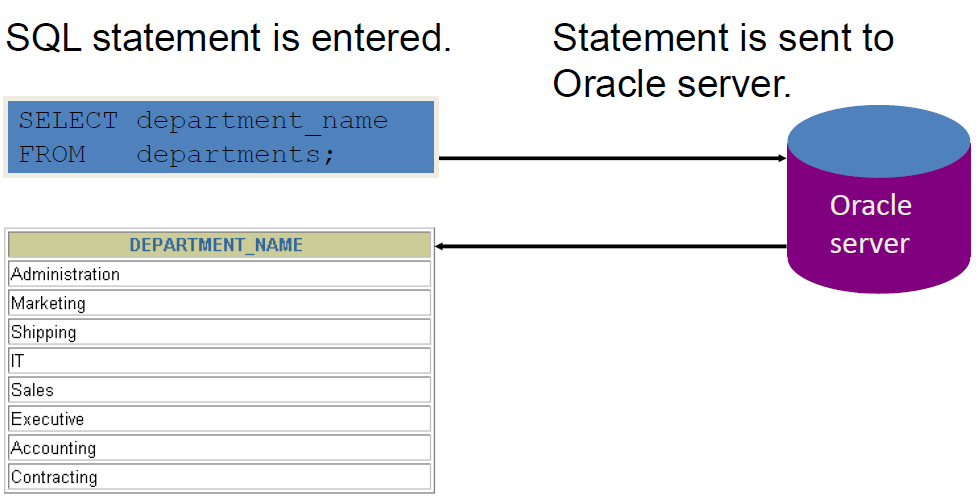
Communicating with an RDBMS Using SQL
SQL Statements
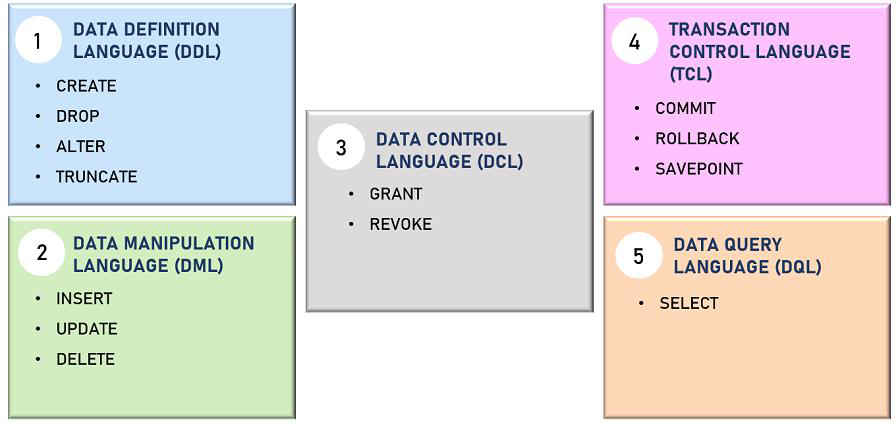
Order of Statements
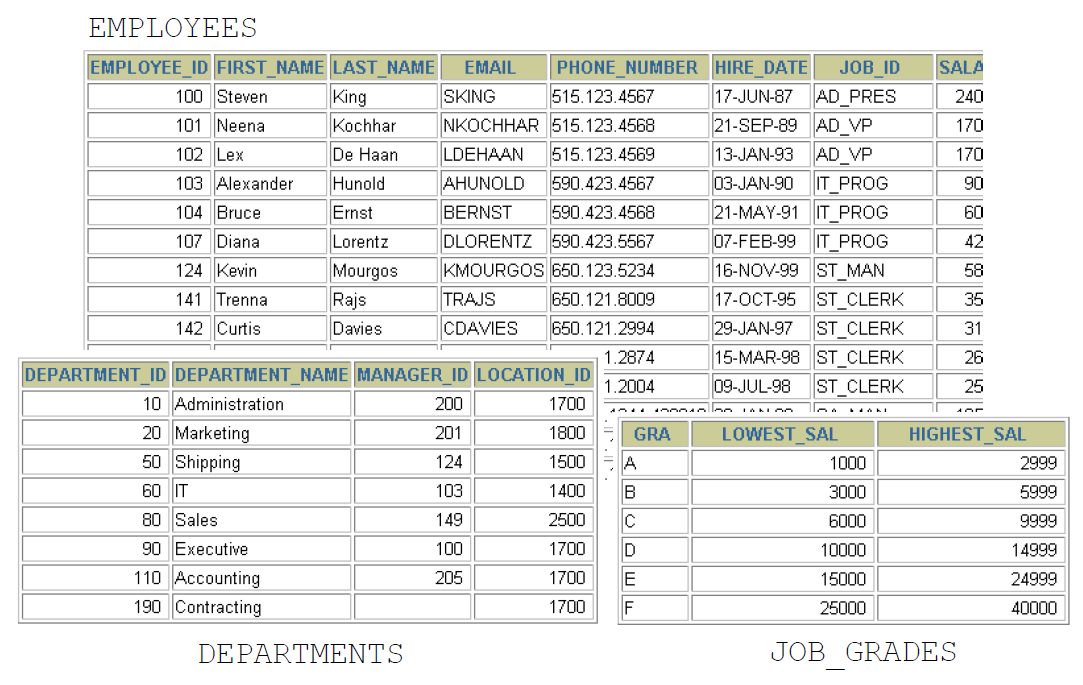
Tables Used in the Course
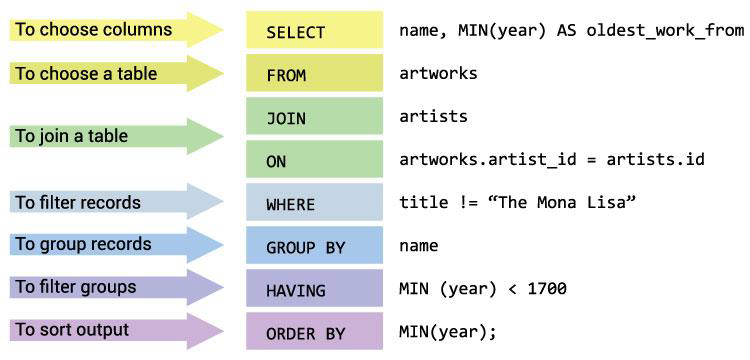
Capabilities of SQL SELECT Statements
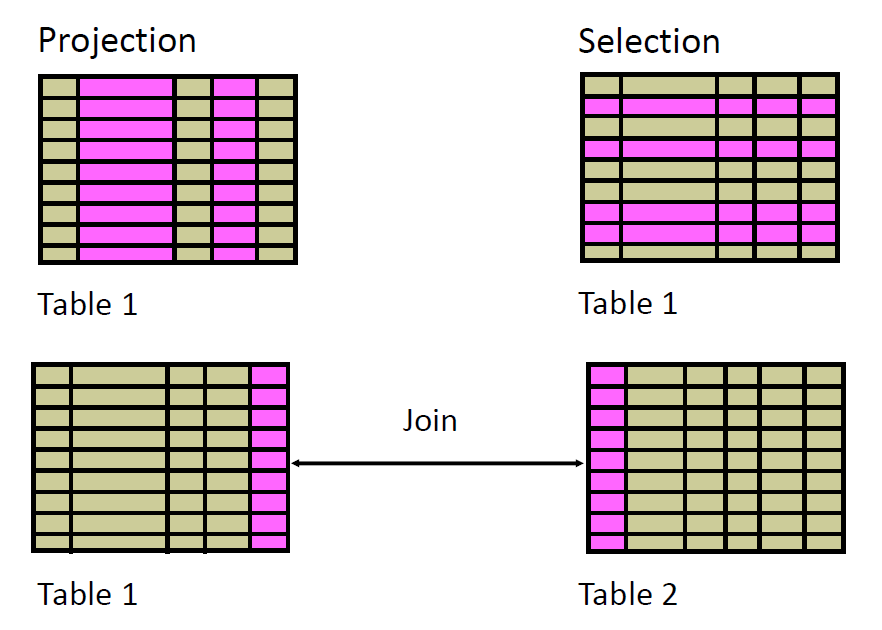
Basic SELECT Statement
SELECT * | {[DISTINCT] column|expression [alias], ...}
FROM table;
- SELECT identifies the columns to be displayed
- FROM identifies the table containing those columns
Selecting All Columns
SELECT * FROM nikovits.departments;
| DEPARTMENT_ID |
DEPARTMENT_NAME |
MANAGER_ID |
LOCATION_ID |
| 10 |
Administration |
200 |
1700 |
| 20 |
Marketing |
201 |
1800 |
| 30 |
Purchasing |
114 |
1700 |
| 40 |
Human Resources |
203 |
2400 |
| 50 |
Shipping |
121 |
1500 |
| 60 |
IT |
103 |
1400 |
| 70 |
Public Relations |
204 |
2700 |
| 80 |
Sales |
145 |
2500 |
| 90 |
Executive |
100 |
1700 |
| 100 |
Finance |
108 |
1700 |
| 110 |
Accounting |
205 |
1700 |
| 120 |
Treasury |
NULL |
1700 |
| 130 |
Corporate Tax |
NULL |
1700 |
Selecting Specific Columns
SELECT department_id, location_id
FROM nikovits.departments;
| DEPARTMENT_ID |
LOCATION_ID |
| 10 |
1700 |
| 20 |
1800 |
| 30 |
1700 |
| 40 |
2400 |
| 50 |
1500 |
| 60 |
1400 |
| 70 |
2700 |
| 80 |
2500 |
| 90 |
1700 |
| 100 |
1700 |
| 110 |
1700 |
| 120 |
1700 |
| 130 |
1700 |
| 140 |
1700 |
| 150 |
1700 |
| 160 |
1700 |
Writing SQL Statements
- SQL statements are not case-sensitive.
- SQL statements can be on one or more lines.
- Keywords cannot be abbreviated or splitacross lines.
- Clauses are usually placed on separate lines.
- Indents are used to enhance readability.
- In SQL*Plus, SQL statements can optionally beterminated by a semicolon (;). Semicolons arerequired if you execute multiple SQLstatements.
Arithmetic Expressions
| Operator |
Description |
| + |
Add |
| - |
Subtract |
| * |
Multiply |
| / |
Divide |
Using Arithmetic Operators
SELECT last_name, salary, salary + 300
FROM nikovits.employees;
| LAST_NAME |
SALARY |
SALARY+300 |
| King |
24000 |
24300 |
| Kochhar |
17000 |
17300 |
| De Haan |
17000 |
17300 |
| Hunold |
9000 |
9300 |
| Ernst |
6000 |
6300 |
| Austin |
4800 |
5100 |
| Pataballa |
4800 |
5100 |
| Lorentz |
4200 |
4500 |
| Greenberg |
12000 |
12300 |
| Faviet |
9000 |
9300 |
| Chen |
8200 |
8500 |
| Sciarra |
7700 |
8000 |
| Urman |
7800 |
8100 |
Operator Precedence
SELECT last_name, salary, 12*salary+100
FROM nikovits.employees;
| LAST_NAME |
SALARY |
12*SALARY+100 |
| King |
24000 |
288100 |
| Kochhar |
17000 |
204100 |
| De Haan |
17000 |
204100 |
| Hunold |
9000 |
108100 |
| Ernst |
6000 |
72100 |
| Austin |
4800 |
57700 |
| Pataballa |
4800 |
57700 |
| Lorentz |
4200 |
50500 |
| Greenberg |
12000 |
144100 |
| Faviet |
9000 |
108100 |
| Chen |
8200 |
98500 |
| Sciarra |
7700 |
92500 |
SELECT last_name, salary, 12*(salary+100)
FROM nikovits.employees;
| LAST_NAME |
SALARY |
12*(SALARY+100) |
| King |
24000 |
289200 |
| Kochhar |
17000 |
205200 |
| De Haan |
17000 |
205200 |
| Hunold |
9000 |
109200 |
| Ernst |
6000 |
73200 |
| Austin |
4800 |
58800 |
| Pataballa |
4800 |
58800 |
| Lorentz |
4200 |
51600 |
| Greenberg |
12000 |
145200 |
| Faviet |
9000 |
109200 |
| Chen |
8200 |
99600 |
| Sciarra |
7700 |
93600 |
| Urman |
7800 |
94800 |
Defining a Null Value
- A null is a value that is unavailable, unassigned,unknown, or inapplicable.
- A null is not the same as a zero or a blank space.
SELECT last_name, job_id, salary, commission_pct
FROM nikovits.employees;
| LAST_NAME |
JOB_ID |
SALARY |
COMMISSION_PCT |
| King |
AD_PRES |
24000 |
NULL |
| Kochhar |
AD_VP |
17000 |
NULL |
| De Haan |
AD_VP |
17000 |
NULL |
| Hunold |
IT_PROG |
9000 |
NULL |
| Ernst |
IT_PROG |
6000 |
NULL |
| Austin |
IT_PROG |
4800 |
NULL |
| Pataballa |
IT_PROG |
4800 |
NULL |
| Lorentz |
IT_PROG |
4200 |
NULL |
| Greenberg |
FI_MGR |
12000 |
NULL |
| Faviet |
FI_ACCOUNT |
9000 |
NULL |
| Chen |
FI_ACCOUNT |
8200 |
NULL |
| Sciarra |
FI_ACCOUNT |
7700 |
NULL |
| Urman |
FI_ACCOUNT |
7800 |
NULL |
Null Values in Arithmetic Expressions
Arithmetic expressions containing a null value evaluate to null.
SELECT last_name, 12*salary*commission_pct
FROM nikovits.employees;
| LAST_NAME |
12SALARYCOMMISSION_PCT |
| King |
NULL |
| Kochhar |
NULL |
| De Haan |
NULL |
| Hunold |
NULL |
| Ernst |
NULL |
| Austin |
NULL |
| Pataballa |
NULL |
| Lorentz |
NULL |
| Greenberg |
NULL |
| Faviet |
NULL |
| Chen |
NULL |
| Sciarra |
NULL |
| Urman |
NULL |
Defining a Column Alias
- Renames a column heading
- Is useful with calculations
- Immediately follows the column name (There canalso be the optional AS keyword between thecolumn name and alias.)
- Requires double quotation marks if it containsspaces or special characters or if it is case-sensitive
Using Column Aliases
SELECT last_name AS name, commission_pct comm
FROM nikovits.employees;
| NAME |
COMM |
| King |
NULL |
| Kochhar |
NULL |
| De Haan |
NULL |
| Hunold |
NULL |
| Ernst |
NULL |
| Austin |
NULL |
| Pataballa |
NULL |
| Lorentz |
NULL |
| Greenberg |
NULL |
| Faviet |
NULL |
| Chen |
NULL |
| Sciarra |
NULL |
| Urman |
NULL |
SELECT last_name "Name" , salary*12 "Annual Salary"
FROM nikovits.employees;
| Name |
Annual Salary |
| King |
288000 |
| Kochhar |
204000 |
| De Haan |
204000 |
| Hunold |
108000 |
| Ernst |
72000 |
| Austin |
57600 |
| Pataballa |
57600 |
| Lorentz |
50400 |
| Greenberg |
144000 |
| Faviet |
108000 |
| Chen |
98400 |
| Sciarra |
92400 |
| Urman |
93600 |
Concatenation Operator
- Links columns or character strings to other columns
- Is represented by two vertical bars (||)
- Creates a resultant column that is a characterexpression
SELECT last_name||job_id AS "Employees"
FROM nikovits.employees;
| Employees |
| KingAD_PRES |
| KochharAD_VP |
| De HaanAD_VP |
| HunoldIT_PROG |
| ErnstIT_PROG |
| AustinIT_PROG |
| PataballaIT_PROG |
| LorentzIT_PROG |
| GreenbergFI_MGR |
| FavietFI_ACCOUNT |
| ChenFI_ACCOUNT |
| SciarraFI_ACCOUNT |
| UrmanFI_ACCOUNT |
Literal Character Strings
- A literal is a character, a number, or a date that is included in the SELECT statement.
- Date and character literal values must beenclosed by single quotation marks.
- Each character string is output once for eachrow returned.
SELECT last_name ||' is a '||job_id
AS "Employee Details"
FROM nikovits.employees;
Alternative Quote(q) Operator
- Specify your own quotation mark delimiter
- Choose any delimiter (or {}, [], <> pairs)
- Increase readability and usability
SELECT department_name ||
        q'[, it's assigned Manager Id: ]'
        || manager_id
        AS "Department and Manager"
FROM nikovits.departments;
Duplicate Rows
SELECT department_id
FROM nikovits.employees;
| DEPARTMENT_ID |
| 90 |
| 90 |
| 90 |
| 60 |
| 60 |
| 60 |
| 60 |
| 60 |
| 100 |
| 100 |
| 100 |
| 100 |
| 100 |
| 100 |
| 30 |
| 30 |
SELECT DISTINCT department_id
FROM nikovits.employees;
| DEPARTMENT_ID |
| 100 |
| 30 |
| NULL |
| 90 |
| 20 |
| 70 |
| 110 |
| 50 |
| 80 |
| 40 |
| 60 |
| 10 |
SQL Statements Versus SQL*Plus Commands
| SQL |
SQL*Plus |
| A language |
An environment |
| ANSI standard |
Oracle-proprietary |
| Keyword cannot be abbreviated |
Keywords can be abbreviated |
| Statements manipulate data and table definitions in the database |
Commands do not allow manipulation of values in the database |
| Runs in database |
Runs on a client machine |
Displaying Table Structure
DESCRIBE nikovits.employees
Limiting the Rows That Are Selected
Restrict the rows that are returned by using the WHERE clause.
SELECT * | {[DISTINCT] column|expression [alias], ...}
FROM table
[WHERE condition(s)];
The WHERE clause follows the FROM clause.
SELECT employee_id, last_name, job_id, department_id
FROM nikovits.employees
WHERE department_id = 90 ;
| EMPLOYEE_ID |
LAST_NAME |
JOB_ID |
DEPARTMENT_ID |
| 100 |
King |
AD_PRES |
90 |
| 101 |
Kochhar |
AD_VP |
90 |
| 102 |
De Haan |
AD_VP |
90 |
Character Strings and Dates
- Character strings and date values are enclosed bysingle quotation marks.
- Character values are case-sensitive, and date valuesare format-sensitive.
- The default date format is DD-MON-YY.
You can change the default date format with:
ALTER SESSION SET nls_date_format='yyyy.mm.dd';
SELECT last_name, job_id, department_id
FROM nikovits.employees
WHERE last_name = 'Whalen' ;
| LAST_NAME |
JOB_ID |
DEPARTMENT_ID |
| Whalen |
AD_ASST |
10 |
Comparison Conditions
| Operator |
Meaning |
| = |
Equal to |
| > |
Greater than |
| >= |
Greater than or equal to |
| < |
Less than |
| <= |
Less than or equal to |
| <> |
Not equal to |
| BETWEEN ... AND ... |
Between two values (inclusive) |
| IN (set) |
Match any of a list of values |
| LIKE |
Match a character pattern |
| IS NULL |
Is a null value |
SELECT last_name, salary
FROM nikovits.employees
WHERE salary <= 3000 ;
| LAST_NAME |
SALARY |
| Baida |
2900 |
| Tobias |
2800 |
| Himuro |
2600 |
| Colmenares |
2500 |
| Mikkilineni |
2700 |
| Landry |
2400 |
| Markle |
2200 |
| Atkinson |
2800 |
| Marlow |
2500 |
| Olson |
2100 |
| Rogers |
2900 |
| Gee |
2400 |
| Philtanker |
2200 |
Use the BETWEEN condition to display rows based on arange of values:
SELECT last_name, salary
FROM nikovits.employees
WHERE salary BETWEEN 2500 AND 3500 ;
| LAST_NAME |
SALARY |
| Khoo |
3100 |
| Baida |
2900 |
| Tobias |
2800 |
| Himuro |
2600 |
| Colmenares |
2500 |
| Nayer |
3200 |
| Mikkilineni |
2700 |
| Bissot |
3300 |
| Atkinson |
2800 |
| Marlow |
2500 |
| Mallin |
3300 |
| Rogers |
2900 |
Use the IN membership condition to test for values in a list:
SELECT employee_id, last_name, salary, manager_id
FROM nikovits.employees
WHERE manager_id IN (100, 101, 201) ;
| EMPLOYEE_ID |
LAST_NAME |
SALARY |
MANAGER_ID |
| 101 |
Kochhar |
17000 |
100 |
| 102 |
De Haan |
17000 |
100 |
| 108 |
Greenberg |
12000 |
101 |
| 114 |
Raphaely |
11000 |
100 |
| 120 |
Weiss |
8000 |
100 |
| 121 |
Fripp |
8200 |
100 |
| 122 |
Kaufling |
7900 |
100 |
| 123 |
Vollman |
6500 |
100 |
| 124 |
Mourgos |
5800 |
100 |
| 145 |
Russell |
14000 |
100 |
| 146 |
Partners |
13500 |
100 |
Using the LIKE Condition
- Use the LIKE condition to perform wildcardsearches of valid search string values.
- Search conditions can contain either literalcharacters or numbers:
- % denotes zero or many characters.
- _ denotes one character.
SELECT first_name
FROM nikovits.employees
WHERE first_name LIKE 'S%' ;
| FIRST_NAME |
| Steven |
| Shelli |
| Sigal |
| Shanta |
| Steven |
| Stephen |
| Sarath |
Using the LIKE Condition
You can use the ESCAPE identifier to search forthe actual % and _ symbols.
SELECT employee_id, last_name, job_id
FROM employees
WHERE job_id LIKE '%SA\_%' ESCAPE '\';
SELECT last_name
FROM nikovits.employees
WHERE last_name LIKE '_o%' ;
| LAST_NAME |
| Kochhar |
| Lorentz |
| Popp |
| Tobias |
| Colmenares |
| Vollman |
| Mourgos |
| Rogers |
Using the NULL Conditions
SELECT last_name, manager_id
FROM nikovits.employees
WHERE manager_id IS NULL ;
| LAST_NAME |
MANAGER_ID |
| King |
NULL |
Logical Conditions
| Operator |
Meaning |
| AND |
Returns TRUE if both component conditions are true |
| OR |
Returns TRUE if either component condition is true |
| NOT |
Returns TRUE if the following condition is false |
3-valued logic
AND Operator
| AND |
TRUE |
FALSE |
NULL |
| TRUE |
TRUE |
FALSE |
NULL |
| FALSE |
FALSE |
FALSE |
FALSE |
| NULL |
NULL |
FALSE |
NULL |
OR Operator
| OR |
TRUE |
FALSE |
NULL |
| TRUE |
TRUE |
TRUE |
TRUE |
| FALSE |
TRUE |
FALSE |
NULL |
| NULL |
TRUE |
NULL |
NULL |
NOT Operator
| NOT |
Result |
| TRUE |
FALSE |
| FALSE |
TRUE |
| NULL |
NULL |
Using the AND Operator
SELECT employee_id, last_name, job_id, salary
FROM nikovits.employees
WHERE salary >=10000
AND job_id LIKE '%MAN%' ;
| EMPLOYEE_ID |
LAST_NAME |
JOB_ID |
SALARY |
| 114 |
Raphaely |
PU_MAN |
11000 |
| 145 |
Russell |
SA_MAN |
14000 |
| 146 |
Partners |
SA_MAN |
13500 |
| 147 |
Errazuriz |
SA_MAN |
12000 |
| 148 |
Cambrault |
SA_MAN |
11000 |
| 149 |
Zlotkey |
SA_MAN |
10500 |
| 201 |
Hartstein |
MK_MAN |
13000 |
Using the OR Operator
SELECT employee_id, last_name, job_id, salary
FROM nikovits.employees
WHERE salary >= 10000
OR job_id LIKE '%MAN%' ;
| EMPLOYEE_ID |
LAST_NAME |
JOB_ID |
SALARY |
| 100 |
King |
AD_PRES |
24000 |
| 101 |
Kochhar |
AD_VP |
17000 |
| 102 |
De Haan |
AD_VP |
17000 |
| 108 |
Greenberg |
FI_MGR |
12000 |
| 114 |
Raphaely |
PU_MAN |
11000 |
| 120 |
Weiss |
ST_MAN |
8000 |
| 121 |
Fripp |
ST_MAN |
8200 |
| 122 |
Kaufling |
ST_MAN |
7900 |
| 123 |
Vollman |
ST_MAN |
6500 |
| 124 |
Mourgos |
ST_MAN |
5800 |
| 145 |
Russell |
SA_MAN |
14000 |
Using the NOT Operator
SELECT last_name, job_id
FROM nikovits.employees
WHERE job_id
NOT IN ('IT_PROG', 'ST_CLERK', 'SA_REP') ;
| LAST_NAME |
JOB_ID |
| King |
AD_PRES |
| Kochhar |
AD_VP |
| De Haan |
AD_VP |
| Greenberg |
FI_MGR |
| Faviet |
FI_ACCOUNT |
| Chen |
FI_ACCOUNT |
| Sciarra |
FI_ACCOUNT |
| Urman |
FI_ACCOUNT |
| Popp |
FI_ACCOUNT |
| Raphaely |
PU_MAN |
| Khoo |
PU_CLERK |
| Baida |
PU_CLERK |
| Tobias |
PU_CLERK |
| Himuro |
PU_CLERK |
Rules of Precedence
Operators in SQL expressions are evaluated according to the following precedence (highest to lowest):
| Priority |
Operator/Condition |
| 1 |
Arithmetic operators (+, -, *, /) |
| 2 |
Concatenation operator (||) |
| 3 |
Comparison conditions (=, >, <, >=, <=, <>) |
| 4 |
IS [NOT] NULL, LIKE, [NOT] IN |
| 5 |
[NOT] BETWEEN |
| 6 |
Not equal to (<>) |
| 7 |
NOT logical condition |
| 8 |
AND logical condition |
| 9 |
OR logical condition |
You can use parentheses () to override the default precedence rules and explicitly control the order of evaluation.
SELECT last_name, job_id, salary
FROM nikovits.employees
WHERE job_id = 'SA_REP'
OR job_id = 'AD_PRES'
AND salary > 15000;
| LAST_NAME |
JOB_ID |
SALARY |
| King |
AD_PRES |
24000 |
| Tucker |
SA_REP |
10000 |
| Bernstein |
SA_REP |
9500 |
| Hall |
SA_REP |
9000 |
| Olsen |
SA_REP |
8000 |
| Cambrault |
SA_REP |
7500 |
| Tuvault |
SA_REP |
7000 |
| King |
SA_REP |
10000 |
| Sully |
SA_REP |
9500 |
| McEwen |
SA_REP |
9000 |
| Smith |
SA_REP |
8000 |
| Doran |
SA_REP |
7500 |
SELECT last_name, job_id, salary
FROM nikovits.employees
WHERE (job_id = 'SA_REP'
OR job_id = 'AD_PRES')
AND salary > 15000;
| LAST_NAME |
JOB_ID |
SALARY |
| King |
AD_PRES |
24000 |
Using the ORDER BY Clause
- Sort retrieved rows with the ORDER BY clause:
- ASC: ascending order, default
- DESC: descending order
SELECT last_name, job_id, department_id, hire_date
FROM nikovits.employees
ORDER BY hire_date ;
| LAST_NAME |
JOB_ID |
DEPARTMENT_ID |
HIRE_DATE |
| King |
AD_PRES |
90 |
17/06/87 |
| Whalen |
AD_ASST |
10 |
17/09/87 |
| Kochhar |
AD_VP |
90 |
21/09/89 |
| Hunold |
IT_PROG |
60 |
03/01/90 |
| Ernst |
IT_PROG |
60 |
21/05/91 |
| De Haan |
AD_VP |
90 |
13/01/93 |
| Mavris |
HR_REP |
40 |
07/06/94 |
| Baer |
PR_REP |
70 |
07/06/94 |
| Higgins |
AC_MGR |
110 |
07/06/94 |
| Gietz |
AC_ACCOUNT |
110 |
07/06/94 |
| Faviet |
FI_ACCOUNT |
100 |
16/08/94 |
| Greenberg |
FI_MGR |
100 |
17/08/94 |
Descending order
SELECT last_name, job_id, department_id, hire_date
FROM nikovits.employees
ORDER BY hire_date DESC ;
| LAST_NAME |
JOB_ID |
DEPARTMENT_ID |
HIRE_DATE |
| Kumar |
SA_REP |
80 |
21/04/00 |
| Banda |
SA_REP |
80 |
21/04/00 |
| Ande |
SA_REP |
80 |
24/03/00 |
| Markle |
ST_CLERK |
50 |
08/03/00 |
| Lee |
SA_REP |
80 |
23/02/00 |
| Philtanker |
ST_CLERK |
50 |
06/02/00 |
| Geoni |
SH_CLERK |
50 |
03/02/00 |
| Zlotkey |
SA_MAN |
80 |
29/01/00 |
| Marvins |
SA_REP |
80 |
24/01/00 |
| Grant |
SH_CLERK |
50 |
13/01/00 |
| Johnson |
SA_REP |
80 |
04/01/00 |
| Perkins |
SH_CLERK |
50 |
19/12/99 |
| Gee |
ST_CLERK |
50 |
12/12/99 |
Alias
SELECT employee_id, last_name, salary*12 annsal
FROM nikovits.employees
ORDER BY annsal ;
| EMPLOYEE_ID |
LAST_NAME |
ANNSAL |
| 132 |
Olson |
25200 |
| 128 |
Markle |
26400 |
| 136 |
Philtanker |
26400 |
| 135 |
Gee |
28800 |
| 127 |
Landry |
28800 |
| 119 |
Colmenares |
30000 |
| 131 |
Marlow |
30000 |
| 140 |
Patel |
30000 |
| 144 |
Vargas |
30000 |
| 182 |
Sullivan |
30000 |
| 191 |
Perkins |
30000 |
| 143 |
Matos |
31200 |
Multiple columns
SELECT last_name, department_id, salary
FROM nikovits.employees
ORDER BY department_id, salary DESC;
| LAST_NAME |
DEPARTMENT_ID |
SALARY |
| Whalen |
10 |
4400 |
| Hartstein |
20 |
13000 |
| Fay |
20 |
6000 |
| Raphaely |
30 |
11000 |
| Khoo |
30 |
3100 |
| Baida |
30 |
2900 |
| Tobias |
30 |
2800 |
| Himuro |
30 |
2600 |
| Colmenares |
30 |
2500 |
| Mavris |
40 |
6500 |
Substitution Variables
UseSQL*Plus substitution variables to:
- Temporarily store values with single-ampersand (&) and double-ampersand(&&) substitution
- Use substitution variables to supplement the following:
- WHERE conditions
- ORDER BY clauses
- Column expressions
- Table names
- Entire SELECT statements
Using the & Substitution Variable
Use a variable prefixed with an ampersand (&) to prompt the user for a value:
SELECT employee_id, last_name, salary, department_id
FROM nikovits.employees
WHERE employee_id = &employee_num ;
Character and Date Values with Substitution Variables
Use single quotation marks for date and character values:
SELECT last_name, department_id, salary*12
FROM nikovits.employees
WHERE job_id = '&job_title' ;
Specifying Column Names, Expressions, and Text
SELECT employee_id, last_name, job_id,&column_name
FROM nikovits.employees
WHERE &condition
ORDER BY &order_column ;
Using the && Substitution Variable
Use the double ampersand (&&) if you want to reuse the variable value without prompting the user eachtime:
SELECT employee_id, last_name, job_id, &&column_name
FROM nikovits.employees
ORDER BY &column_name ;
- Use the SQLPlus DEFINE* command to create and assign a value to a variable.
- Use the SQLPlus UNDEFINE* command to remove a variable.
DEFINE employee_num = 200
SELECT employee_id, last_name, salary, department_id
FROM nikovits.employees
WHERE employee_id = &employee_num ;
UNDEFINE employee_num