Group By
Creating Groups of Data
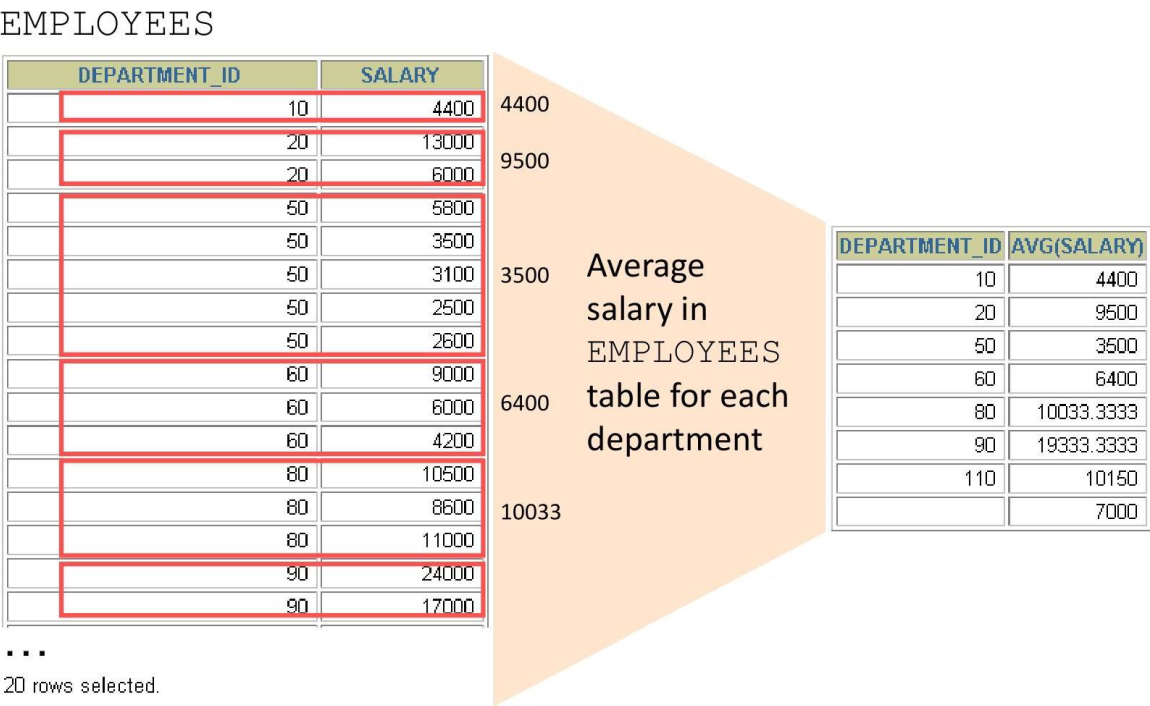
Creating Groups of Data: GROUP BY Clause Syntax
SELECT     column, group_function(column)
FROM       table
[WHERE     condition]
[GROUP BY  group_by_expression]
[ORDER BY  column];
You can divide rows in a table into smaller groups by using the GROUP BY clause.
Using the GROUP BY Clause
All columns in the SELECT list that are not in group functions must be in the GROUP BY clause.
| DEPARTMENT_ID | AVG(SALARY) |
|---|---|
| 100 | 8600 |
| 30 | 4150 |
| NULL | 7000 |
| 90 | 19333.33333333333333 |
| 20 | 9500 |
| 70 | 10000 |
| 110 | 10150 |
| 50 | 3475.555555555555555 |
| 80 | 8955.882352941176470 |
| 40 | 6500 |
| 60 | 5760 |
| 10 | 4400 |
Using the GROUP BY Clause
The GROUP BY column does not have to be in the SELECT list.
| AVG(SALARY) |
|---|
| 8600 |
| 4150 |
| 7000 |
| 19333.33333333333333 |
| 9500 |
| 10000 |
| 10150 |
| 3475.555555555555555 |
| 8955.882352941176470 |
| 6500 |
| 5760 |
| 4400 |
Grouping by More Than One Column
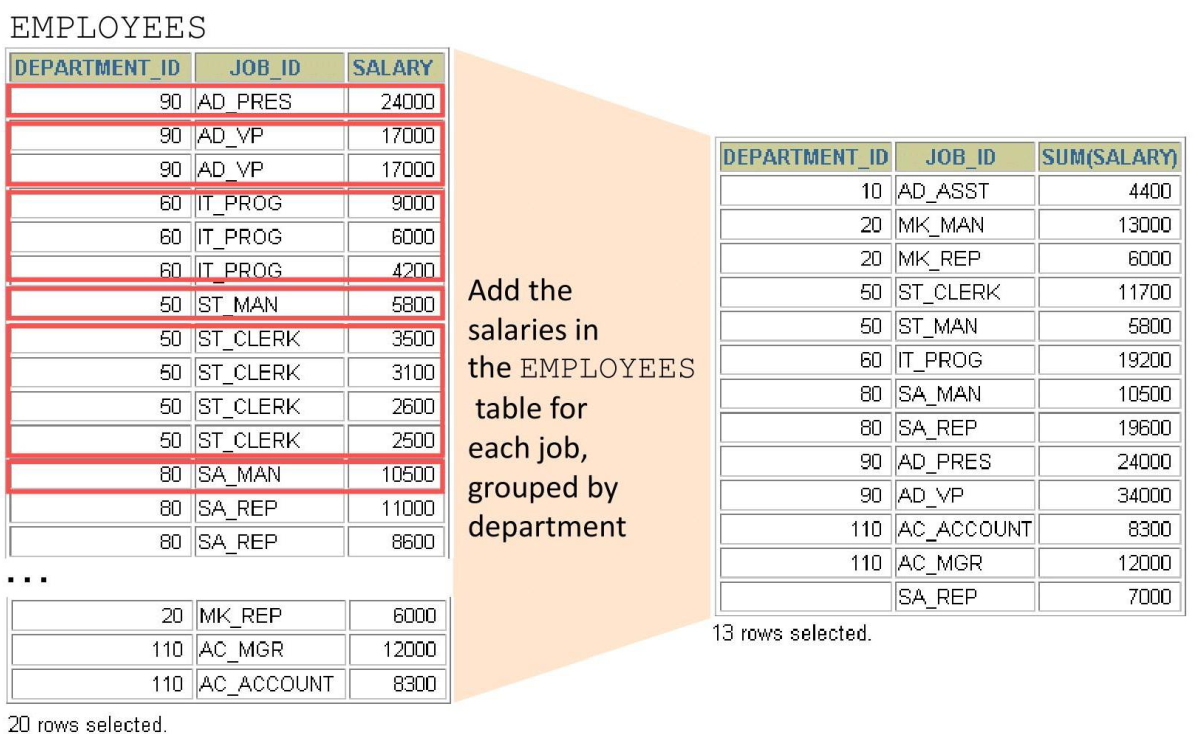
Using the GROUP BY Clause on Multiple Columns
SELECT department_id dept_id, job_id, SUM(salary)
FROM nikovits.employees
GROUP BY department_id, job_id ;
| DEPT_ID | JOB_ID | SUM(SALARY) |
|---|---|---|
| 110 | AC_ACCOUNT | 8300 |
| 90 | AD_VP | 34000 |
| 50 | ST_CLERK | 55700 |
| 80 | SA_REP | 243500 |
| 50 | ST_MAN | 36400 |
| 80 | SA_MAN | 61000 |
| 110 | AC_MGR | 12000 |
| 90 | AD_PRES | 24000 |
| 60 | IT_PROG | 28800 |
| 100 | FI_MGR | 12000 |
| 30 | PU_CLERK | 13900 |
| 50 | SH_CLERK | 64300 |
| 20 | MK_MAN | 13000 |
| 100 | FI_ACCOUNT | 39600 |
| NULL | SA_REP | 7000 |
| 70 | PR_REP | 10000 |
| 30 | PU_MAN | 11000 |
| 10 | AD_ASST | 4400 |
| 20 | MK_REP | 6000 |
| 40 | HR_REP | 6500 |
Illegal Queries Using Group Functions
Any column or expression in the SELECT list that is not an aggregate function must be in the GROUP BY clause:
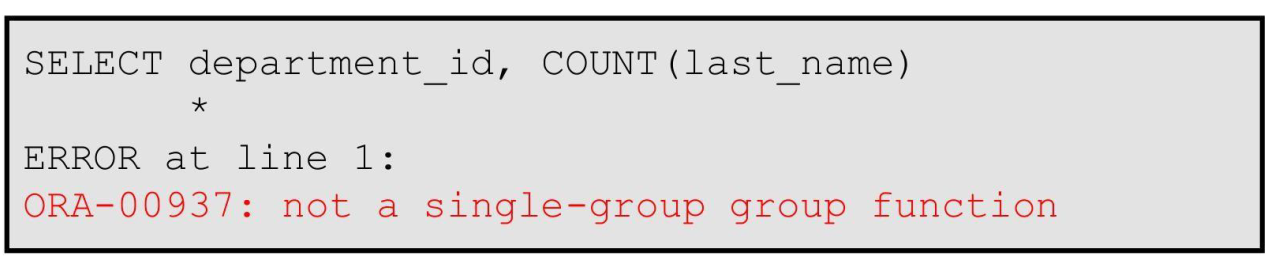
Column missing in the GROUP BY clause
Illegal Queries Using Group Functions
- You cannot use the WHERE clause to restrict groups.
- You use the HAVING clause to restrict groups.
- You cannot use group functions in the WHERE clause.

Cannot use the WHERE clause to restrict groups
Restricting Group Functions
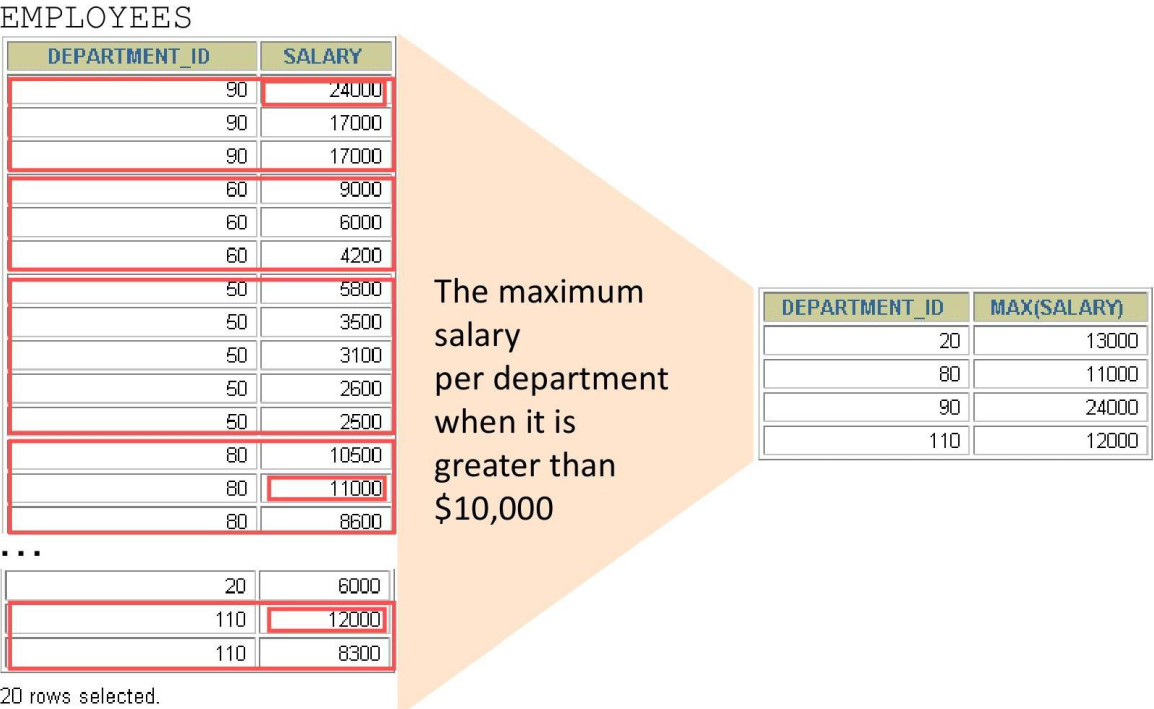
Restricting Group Results with the HAVING Clause
- When you use the HAVING clause, the Oracle server restricts groups as follows:
- Rows are grouped.
- The group function is applied.
- Groups matching the HAVING clause are displayed.
SELECT     column, group_function
FROM       table
[WHERE     condition]
[GROUP BY  group_by_expression]
[HAVING    group_condition]
[ORDER BY  column];
Using the HAVING Clause
SELECT department_id, MAX(salary)
FROM nikovits.employees
GROUP BY department_id
HAVING MAX(salary)>10000 ;
| DEPARTMENT_ID | MAX(SALARY) |
|---|---|
| 100 | 12000 |
| 30 | 11000 |
| 90 | 24000 |
| 20 | 13000 |
| 110 | 12000 |
| 80 | 14000 |
SELECT job_id, SUM(salary) PAYROLL
FROM nikovits.employees
WHERE job_id NOT LIKE '%REP%'
GROUP BY job_id
HAVING SUM(salary) > 13000
ORDER BY SUM(salary);
| JOB_ID | PAYROLL |
|---|---|
| PU_CLERK | 13900 |
| AD_PRES | 24000 |
| IT_PROG | 28800 |
| AD_VP | 34000 |
| ST_MAN | 36400 |
| FI_ACCOUNT | 39600 |
| ST_CLERK | 55700 |
| SA_MAN | 61000 |
| SH_CLERK | 64300 |
Nesting Group Functions
- Display the maximum average salary:
- Group functions can be nested to a depth of two.
- The example displays the maximum average salary.
| MAX(AVG(SALARY)) |
|---|
| 19333.33333333333333 |