Joins
Obtaining Data from Multiple Tables
Types of Joins
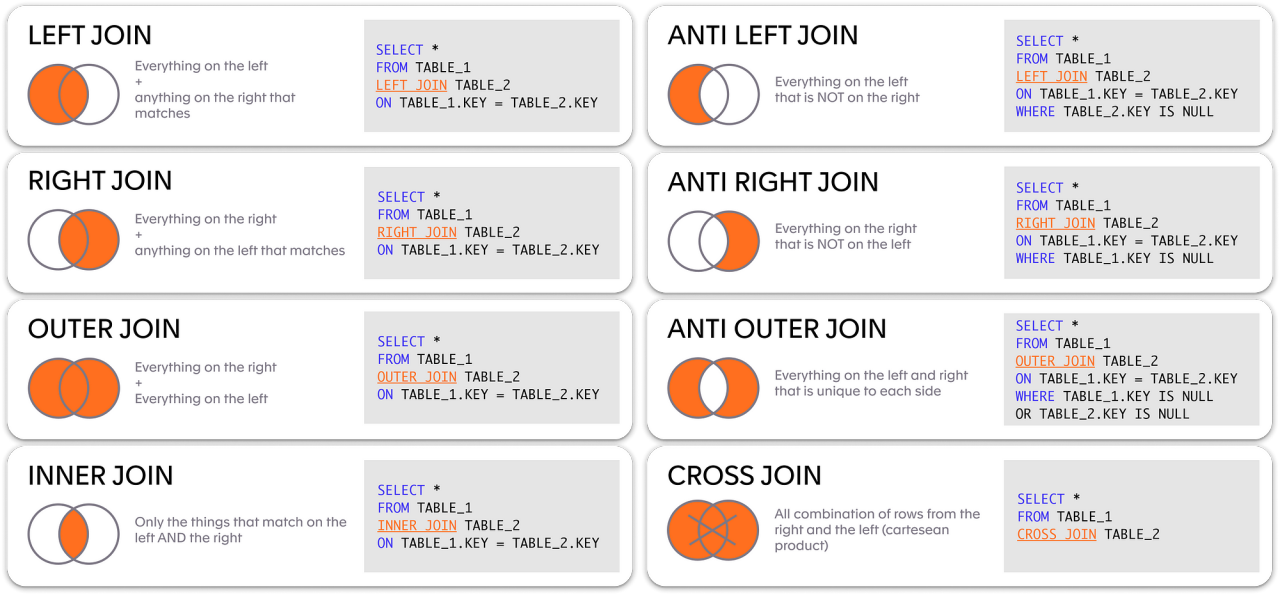
- Joins that are compliant with the SQL:1999 standard include the following: – Cross joins – Natural joins – USING clause – Full (or two-sided) outer joins – Arbitrary join conditions for outer joins
Joining Tables Using SQL:1999 Syntax
Use a join to query data from more than one table:
SELECT table1.column, table2.column
FROM   table1
[NATURAL JOIN table2] |
[JOIN table2 USING (column_name)] |
[JOIN table2
 ON (table1.column_name = table2.column_name)] |
[LEFT|RIGHT|FULL OUTER JOIN table2
 ON (table1.column_name = table2.column_name)] |
[CROSS JOIN table2];
Creating Natural Joins
- The NATURAL JOIN clause is based on all columns in the two tables that have the same name.
- It selects rows from the two tables that have equal values in all matched columns.
- If the columns having the same names have different data types, an error is returned.
Retrieving Records with Natural Joins
SELECT department_id, department_name,
location_id, city
FROM nikovits.departments
NATURAL JOIN nikovits.locations ;
| DEPARTMENT_ID | DEPARTMENT_NAME | LOCATION_ID | CITY |
|---|---|---|---|
| 10 | Administration | 1700 | Seattle |
| 20 | Marketing | 1800 | Toronto |
| 30 | Purchasing | 1700 | Seattle |
| 40 | Human Resources | 2400 | London |
| 50 | Shipping | 1500 | South San Francisco |
| 60 | IT | 1400 | Southlake |
| 70 | Public Relations | 2700 | Munich |
| 80 | Sales | 2500 | Oxford |
| 90 | Executive | 1700 | Seattle |
| 100 | Finance | 1700 | Seattle |
| 110 | Accounting | 1700 | Seattle |
| 120 | Treasury | 1700 | Seattle |
Creating Joins with the USING Clause
- If several columns have the same names but the data types do not match, the NATURAL JOIN clause can be modified with the USING clause to specify the columns that should be used for an equijoin.
- Use the USING clause to match only one column when more than one column matches.
- Do not use a table name or alias in the referenced columns.
- The NATURAL JOIN and USING clauses are mutually exclusive.
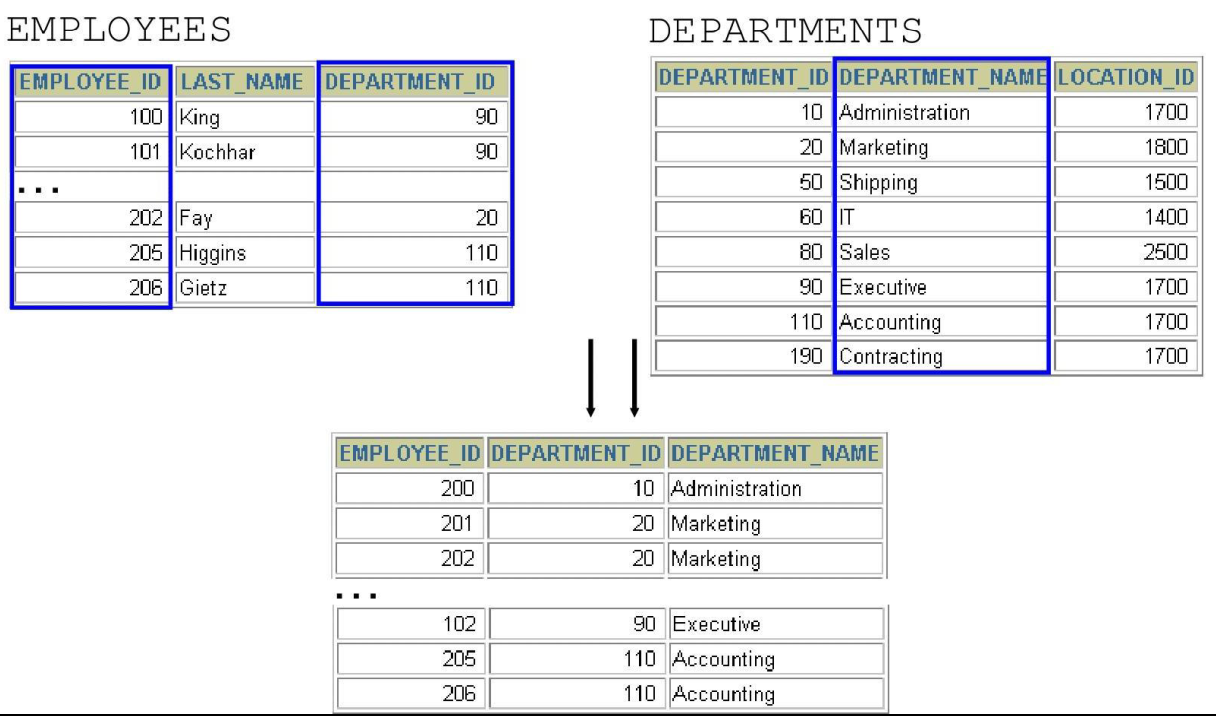
Joining Column Names
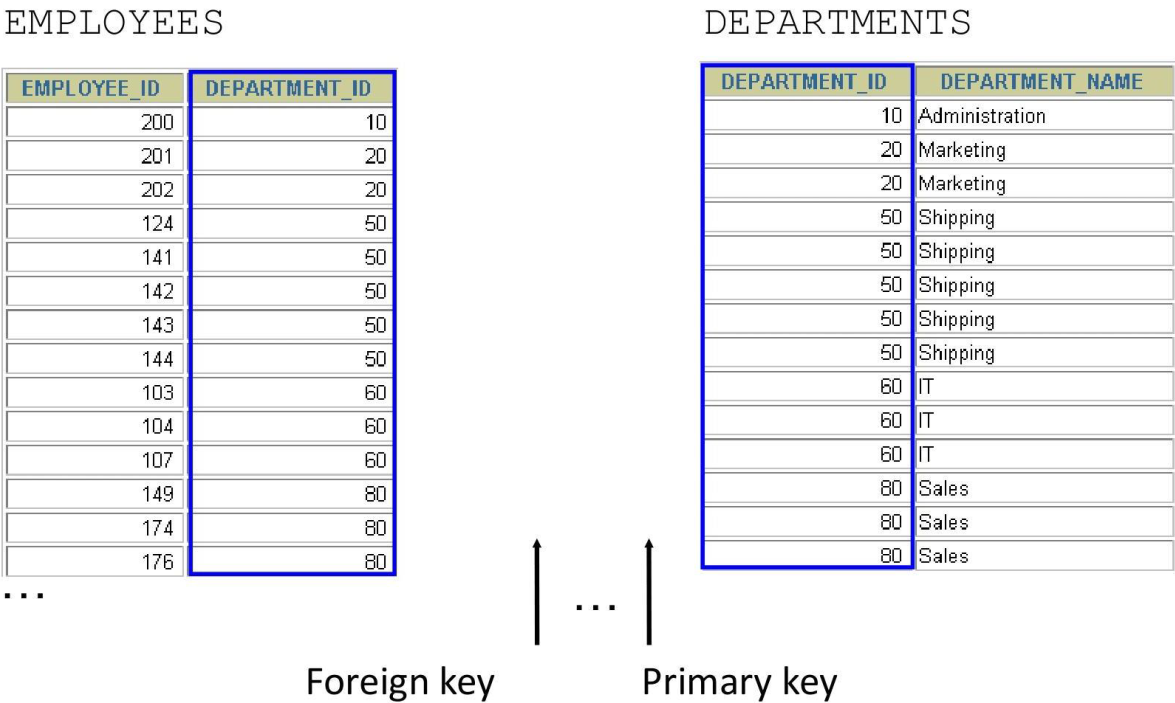
SELECT nikovits.employees.employee_id, nikovits.employees.last_name,
nikovits.departments.location_id, department_id
FROM nikovits.employees JOIN nikovits.departments
USING (department_id) ;
| EMPLOYEE_ID | LAST_NAME | LOCATION_ID | DEPARTMENT_ID |
|---|---|---|---|
| 100 | King | 1700 | 90 |
| 101 | Kochhar | 1700 | 90 |
| 102 | De Haan | 1700 | 90 |
| 103 | Hunold | 1400 | 60 |
| 104 | Ernst | 1400 | 60 |
| 105 | Austin | 1400 | 60 |
| 106 | Pataballa | 1400 | 60 |
| 107 | Lorentz | 1400 | 60 |
| 108 | Greenberg | 1700 | 100 |
| 109 | Faviet | 1700 | 100 |
| 110 | Chen | 1700 | 100 |
Qualifying Ambiguous
Column Names
- Use table prefixes to qualify column names that are in multiple tables.
- Use table prefixes to improve performance.
- Use column aliases to distinguish columns that have identical names but reside in different tables.
- Do not use aliases on columns that are identified in the USING clause and listed elsewhere in the SQL statement.
Using Table Aliases
- Use table aliases to simplify queries.
- Use table aliases to improve performance.
SELECT e.employee_id, e.last_name,
       d.location_id, department_id
FROM   employees e JOIN departments d
USING  (department_id) ;
Creating Joins with the ON Clause
- The join condition for the natural join is basically an equijoin of all columns with the same name.
- Use the ON clause to specify arbitrary conditions or specify columns to join.
- The join condition is separated from other search conditions.
- The ON clause makes code easy to understand.
SELECT e.employee_id, e.last_name, e.department_id,
d.department_id, d.location_id
FROM nikovits.employees e JOIN nikovits.departments d
ON (e.department_id = d.department_id);
| EMPLOYEE_ID | LAST_NAME | DEPARTMENT_ID | DEPARTMENT_ID | LOCATION_ID |
|---|---|---|---|---|
| 100 | King | 90 | 90 | 1700 |
| 101 | Kochhar | 90 | 90 | 1700 |
| 102 | De Haan | 90 | 90 | 1700 |
| 103 | Hunold | 60 | 60 | 1400 |
| 104 | Ernst | 60 | 60 | 1400 |
| 105 | Austin | 60 | 60 | 1400 |
| 106 | Pataballa | 60 | 60 | 1400 |
| 107 | Lorentz | 60 | 60 | 1400 |
| 108 | Greenberg | 100 | 100 | 1700 |
| 109 | Faviet | 100 | 100 | 1700 |
| 110 | Chen | 100 | 100 | 1700 |
| 111 | Sciarra | 100 | 100 | 1700 |
| 112 | Urman | 100 | 100 | 1700 |
| 113 | Popp | 100 | 100 | 1700 |
| 114 | Raphaely | 30 | 30 | 1700 |
Self-Joins Using the ON Clause
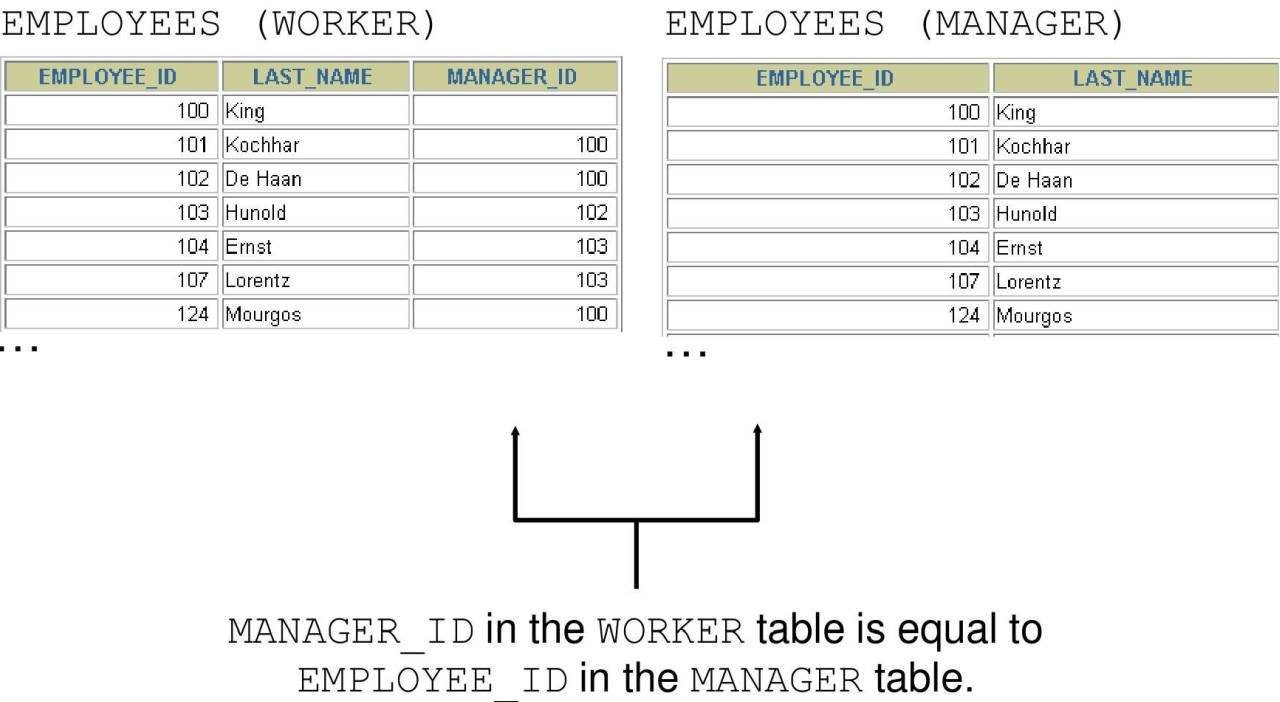
SELECT e.last_name emp, m.last_name mgr
FROM nikovits.employees e JOIN nikovits.employees m
ON (e.manager_id = m.employee_id);
| EMP | MGR |
|---|---|
| Kochhar | King |
| De Haan | King |
| Raphaely | King |
| Weiss | King |
| Fripp | King |
| Kaufling | King |
| Vollman | King |
| Mourgos | King |
| Russell | King |
| Partners | King |
| Errazuriz | King |
| Cambrault | King |
| Zlotkey | King |
Applying Additional Conditions to a Join
SELECT e.employee_id, e.last_name, e.department_id,
       d.department_id, d.location_id
FROM   employees e JOIN departments d
ON     (e.department_id = d.department_id)
AND    e.manager_id = 149;
| EMPLOYEE_ID | LAST_NAME | DEPARTMENT_ID | DEPARTMENT_ID | LOCATION_ID |
|---|---|---|---|---|
| 174 | Abel | 80 | 80 | 2500 |
| 178 | Taylor | 80 | 80 | 2500 |
Alternatively, you can use a WHERE clause to apply additional conditions:
SELECT e.employee_id, e.last_name, e.department_id,
       d.department_id, d.location_id
FROM   employees e JOIN departments d
ON     (e.department_id = d.department_id)
WHERE  e.manager_id = 149;
Creating Three-Way Joins with the ON Clause
SELECT employee_id, city, department_name
FROM nikovits.employees e
JOIN nikovits.departments d
ON d.department_id = e.department_id
JOIN nikovits.locations l
ON d.location_id = l.location_id;
| EMPLOYEE_ID | CITY | DEPARTMENT_NAME |
|---|---|---|
| 100 | Seattle | Executive |
| 101 | Seattle | Executive |
| 102 | Seattle | Executive |
| 103 | Southlake | IT |
| 104 | Southlake | IT |
| 105 | Southlake | IT |
| 106 | Southlake | IT |
| 107 | Southlake | IT |
| 108 | Seattle | Finance |
| 109 | Seattle | Finance |
| 110 | Seattle | Finance |
| 111 | Seattle | Finance |
| 112 | Seattle | Finance |
| 113 | Seattle | Finance |
Non-Equijoin
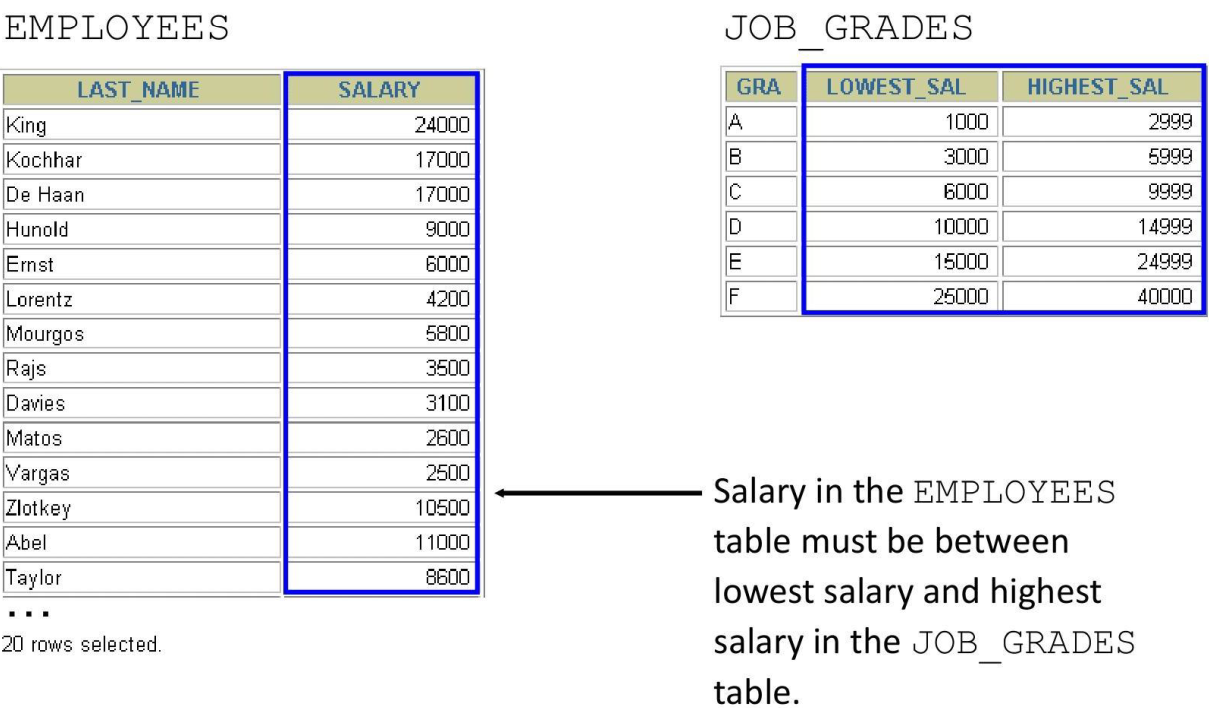
SELECT e.last_name, e.salary, j.grade_level
FROM nikovits.employees e JOIN nikovits.job_grades j
ON e.salary
BETWEEN j.lowest_sal AND j.highest_sal;
| LAST_NAME | SALARY | GRADE_LEVEL |
|---|---|---|
| Olson | 2100 | A |
| Markle | 2200 | A |
| Philtanker | 2200 | A |
| Landry | 2400 | A |
| Gee | 2400 | A |
| Colmenares | 2500 | A |
| Marlow | 2500 | A |
| Patel | 2500 | A |
| Vargas | 2500 | A |
| Sullivan | 2500 | A |
| Perkins | 2500 | A |
| Himuro | 2600 | A |
Outer Joins
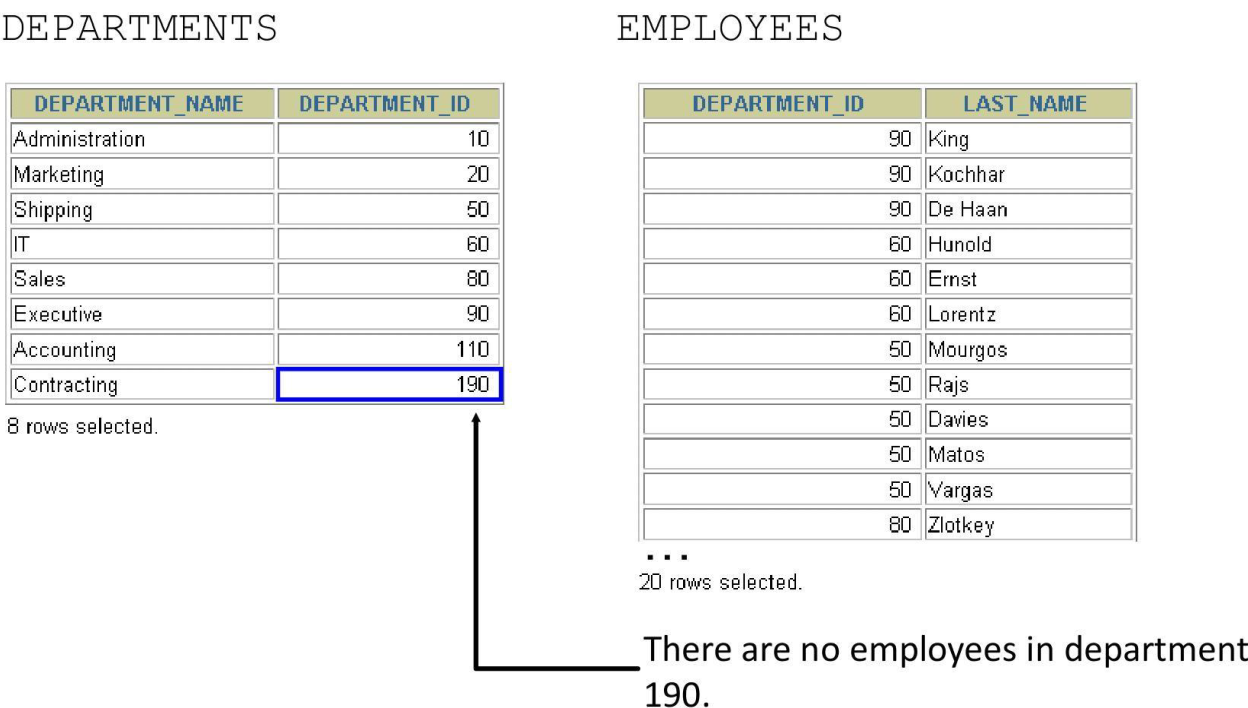
INNER Versus OUTER Joins
- In SQL:1999, the join of two tables returning only matched rows is called an inner join.
- A join between two tables that returns the results of the inner join as well as the unmatched rows from the left (or right) tables is called a left (or right) outer join.
- A join between two tables that returns the results of an inner join as well as the results of a left and right join is a full outer join.
LEFT OUTER JOIN
SELECT e.last_name, e.department_id, d.department_name
FROM nikovits.employees e LEFT OUTER JOIN nikovits.departments d
ON (e.department_id = d.department_id) ;
| LAST_NAME | DEPARTMENT_ID | DEPARTMENT_NAME |
|---|---|---|
| Whalen | 10 | Administration |
| Hartstein | 20 | Marketing |
| Fay | 20 | Marketing |
| Raphaely | 30 | Purchasing |
| Khoo | 30 | Purchasing |
| Baida | 30 | Purchasing |
| Tobias | 30 | Purchasing |
| Himuro | 30 | Purchasing |
| Colmenares | 30 | Purchasing |
| Mavris | 40 | Human Resources |
| Weiss | 50 | Shipping |
| Fripp | 50 | Shipping |
| Kaufling | 50 | Shipping |
RIGHT OUTER JOIN
SELECT e.last_name, e.department_id, d.department_name
FROM nikovits.employees e RIGHT OUTER JOIN nikovits.departments d
ON (e.department_id = d.department_id) ;
| LAST_NAME | DEPARTMENT_ID | DEPARTMENT_NAME |
|---|---|---|
| King | 90 | Executive |
| Kochhar | 90 | Executive |
| De Haan | 90 | Executive |
| Hunold | 60 | IT |
| Ernst | 60 | IT |
| Austin | 60 | IT |
| Pataballa | 60 | IT |
| Lorentz | 60 | IT |
| Greenberg | 100 | Finance |
| Faviet | 100 | Finance |
FULL OUTER JOIN
SELECT e.last_name, d.department_id, d.department_name
FROM nikovits.employees e FULL OUTER JOIN nikovits.departments d
ON (e.department_id = d.department_id) ;
| LAST_NAME | DEPARTMENT_ID | DEPARTMENT_NAME |
|---|---|---|
| King | 90 | Executive |
| Kochhar | 90 | Executive |
| De Haan | 90 | Executive |
| Hunold | 60 | IT |
| Ernst | 60 | IT |
| Austin | 60 | IT |
| Pataballa | 60 | IT |
| Lorentz | 60 | IT |
| Greenberg | 100 | Finance |
| Faviet | 100 | Finance |
| Chen | 100 | Finance |
| Sciarra | 100 | Finance |
Cartesian Products
-
A Cartesian product is formed when:
-
A join condition is omitted
- A join condition is invalid
-
All rows in the first table are joined to all rows in the second table
-
To avoid a Cartesian product, always include a valid join condition.
Generating a Cartesian Product
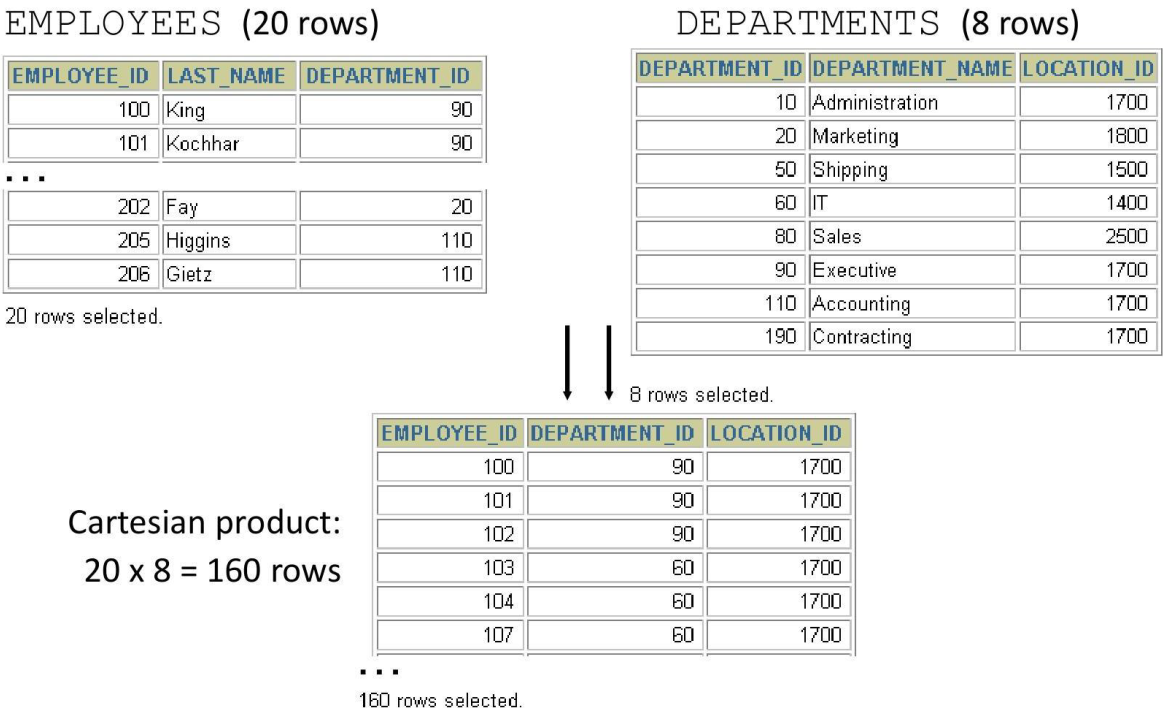
Creating Cross Joins
- The CROSS JOIN clause produces the crossproduct of two tables.
- This is also called a Cartesian product between the two tables.
| LAST_NAME | DEPARTMENT_NAME |
|---|---|
| King | Administration |
| Kochhar | Administration |
| De Haan | Administration |
| Hunold | Administration |
| Ernst | Administration |
| Austin | Administration |
| Pataballa | Administration |
| Lorentz | Administration |
| Greenberg | Administration |
| Faviet | Administration |
| Chen | Administration |
| Sciarra | Administration |
Joins Summary